


GreenCast Connect by Syngenta
4.04.00 Reviews
App Specs
- Version
- 1.4.2
- Updated On
- License
- Free
- Downloads
- 10,000+
- Developer
- Spiio
- Categories
- Weather
- Platform
- Android
Screenshots
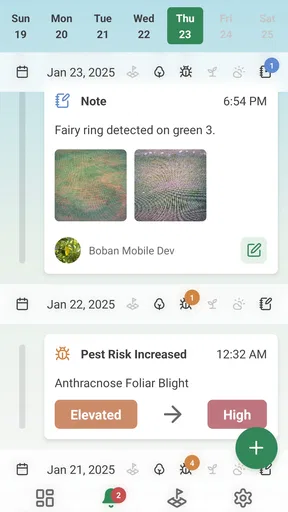
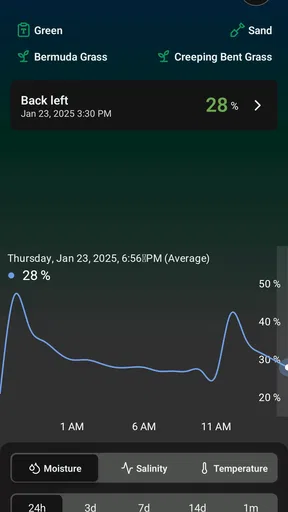
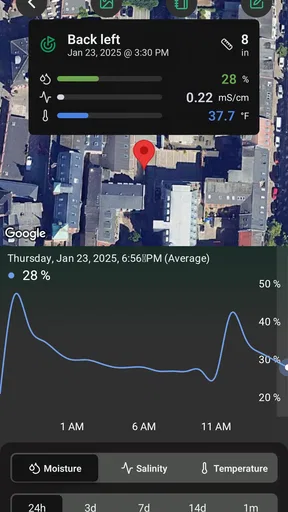
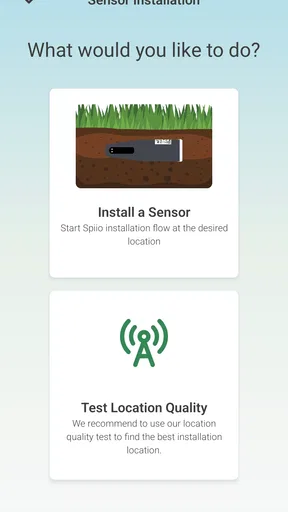
 Analysis by AppCompare
Managing turf well often comes down to making a better decision at the right moment. That sounds simple until weather changes, irrigation windows move, and a lawn or playing surface starts showing stress before it is obvious to the eye. GreenCast Connect by Spiio is a free weather app aimed at that practical problem. Rather than treating weather as something you check only before leaving home, it presents the service as a tool for people who care about turf condition and day-to-day agronomy. I found that focus more interesting than the usual general-purpose forecast approach.
The app belongs to the weather category, but it is not designed around casual questions such as whether I should carry an umbrella. Its identity is tied to digital turf agronomy: using weather information to support decisions about maintaining grass. That makes it a more specialized choice than a standard weather app. It will appeal most to someone responsible for a lawn, sports surface, landscaped property, or another area where timing matters. For a person who only wants a quick temperature reading, its main advantage may feel unnecessarily narrow.
GreenCast Connect is developed by Spiio and is available free of charge. It is rated for Everyone, so its intended audience is not restricted to a specialist age group. The app launched on January 15, 2025, and the current version is 1.4.2. Its average rating is 4.0 from around 36 ratings, while the app has passed 10K installs. Those figures suggest a small but visible audience rather than a mainstream weather service, which fits its focused purpose.
Turning weather information into a turf decision
I find the most useful way to judge GreenCast Connect is to ask whether its weather information changes a real turf-care decision, rather than simply adding another forecast to my phone. In this section, I look at how that connection can shape planning, while keeping the final call grounded in what I can observe on site. That distinction leads naturally to the app’s most important capability.
The capability that matters most
The central value of GreenCast Connect is the attempt to connect weather awareness with turf care instead of leaving the user to interpret a generic forecast alone. In ordinary use, that changes the question I ask. I am not simply wondering what the weather will do; I am considering whether current conditions are suitable for work on grass, whether a planned task should wait, and how much confidence I should place in the timing.
That distinction is important because turf rarely responds to a single weather detail in isolation. A warm day can look favorable, yet recent or expected moisture may change the result. A dry forecast may make irrigation seem obvious, while the condition of the surface tells a different story. An app with an agronomy-oriented purpose encourages a more connected way of thinking, even when the final decision still requires observation on site.
I would not describe the app as a replacement for professional judgement. It is better understood as a decision aid. The forecast gives context, but the person using it still needs to know the turf, understand the local setting, and recognize when a real inspection matters more than a screen. That is a healthy limitation rather than a flaw: weather information can support a maintenance plan, but it cannot see every shaded corner, compacted patch, drainage issue, or recently treated area.
Worth Reading Before You Choose

EA SPORTS FC Mobile 26 Is a Bigger Football Game, but It Takes Time

Flipboard Shows What News Apps Must Do Beyond the Feed

Switching to Android Auto Means Rethinking Your Driving Routine

Google Calendar Makes a Crowded Week Easier to Manage

Ludo King Makes the Most of the Minutes Between Plans

Baby Panda World Brings Quick Play to Modern Phones, but Its Game Library Feels Busy
For me, the strongest benefit is the reduction of guesswork. A general weather app can show plenty of information, but it often leaves the user to translate that information into a turf-related action. GreenCast Connect starts from the more useful question of how weather affects grass management. That focus gives the app a clearer purpose than a broad forecast tool, particularly for users who check conditions as part of a recurring maintenance routine.
What changes in everyday use
The practical effect is easiest to understand through a routine. Imagine that I am responsible for a landscaped property and have planned work on a morning when the surface needs to be in a suitable condition. Instead of checking a forecast only once, I can use the app as part of a short planning process: look at the expected conditions, compare them with what I can see outside, and decide whether the planned task still makes sense. The useful outcome is not a dramatic prediction; it is a more deliberate choice.
That workflow also helps separate planning from confirmation. I might review the app before arranging staff or equipment, then check the surface directly before starting. If the weather picture has shifted, I can change the order of work rather than discovering the problem halfway through. This is a small operational improvement, but on turf it can prevent wasted effort and avoid working at an unsuitable time.
A second useful habit is to treat the app as a record of changing conditions rather than a single yes-or-no signal. I would look for trends around the task I am considering, then ask whether the forecast supports the condition I want to preserve. This approach is more reliable than reacting to one attractive-looking day. It also makes the app more valuable for people who maintain turf repeatedly, because they can build a consistent routine around checking conditions rather than relying on memory.
There is a trade-off here. A specialist weather tool may require more interpretation than a familiar consumer forecast. Someone opening it for a quick glance may expect an immediate answer, while a turf manager is more likely to accept that the information needs to be combined with practical knowledge. I see this as the main adjustment for new users: the app is most useful when it becomes part of a maintenance workflow, not when it is treated as a universal weather oracle.
A realistic maintenance scenario
Consider a small sports field after a period of unsettled weather. The person responsible has a scheduled maintenance window and wants to avoid making the surface worse. A normal weather app might provide a forecast, but the user still has to decide what that means for the field. With GreenCast Connect, the weather check is framed around turf care, so the user can make the forecast part of a broader decision: inspect the surface, consider the upcoming conditions, and decide whether the planned work should proceed, be rearranged, or be delayed.
The important point is not that the app makes the decision automatically. Its value is that it puts the weather question closer to the maintenance question. That can be especially helpful when several people share responsibility for the same area. A consistent app-based check gives everyone a common starting point, while the final call can still reflect what is happening on the ground.
I also see a use for homeowners with demanding lawns, although the benefit depends on how seriously they manage the space. A person who simply wants grass that looks acceptable may find a standard weather app easier and faster. Someone who has invested time in a carefully maintained lawn, however, may appreciate a tool that encourages better timing instead of treating every dry or sunny day as automatically suitable for work.
Where it fits beside ordinary weather apps
General weather apps remain better for broad daily planning. They are familiar, often visually quick to scan, and useful when I need conditions for commuting, travel, or outdoor plans. GreenCast Connect has a different reason to exist. Its appeal comes from narrowing attention toward turf and agronomy, which can make the information more relevant when grass maintenance is the actual concern.
The comparison is therefore less about which app has the biggest forecast and more about which app matches the decision. If I am choosing clothing for the day, I would reach for a conventional weather service. If I am deciding how to organize turf-related work, the specialized focus of GreenCast Connect is more appropriate. Using both types of app could make sense for some people: one for general life and one for a maintenance routine.
That specialization also explains why I would not recommend installing it purely because it is free. Free access removes the financial barrier, but it does not remove the need for a relevant use case. The app earns its place when weather affects the quality, timing, or workload of turf care. Without that connection, it may feel like an extra step rather than a better one.
The trade-offs I noticed
The first limitation is the narrow audience. The app’s turf-centered purpose is its clearest strength, but it also means casual users may not get much from it. A general forecast can be more convenient for everyday weather questions, and a person who never manages grass will probably not benefit from changing their routine for this app.
The second limitation is that digital guidance cannot replace local inspection. Turf conditions vary within the same property, and a forecast cannot fully account for shade, soil, drainage, foot traffic, or recent work. I would use the app to prepare and prioritize, then verify the situation in person. Anyone expecting a single screen to remove all uncertainty is likely to be disappointed.
The third trade-off is learning. A focused agronomy tool asks me to think in terms of consequences rather than just weather symbols. That can be rewarding, but it may also feel less immediate than an app built for quick consumption. My advice is to begin with one repeatable task, such as planning a maintenance window, instead of trying to make the app answer every turf question at once.
There is also a practical issue with confidence. The app’s four-point average from its early, relatively small audience is encouraging but not enough for me to treat it as universally proven. I would test it against my own observations for a while before making important operational decisions around it. That is sensible for any weather-based tool, especially one being used on valuable or heavily used turf.
Small workflow improvements that make it more useful
My first tip is to check the app before committing resources, not only immediately before beginning work. If people, equipment, or access arrangements are involved, an earlier look gives me time to adjust the plan. I would then perform a final on-site check rather than assuming the earlier forecast settled the matter.
My second tip is to pair the app with a simple observation habit. Before opening it, I would note how the turf looks and feels, then compare that impression with the weather information. This prevents the screen from becoming the only source of truth and helps reveal when local conditions are behaving differently from the broader forecast.
My third tip is to use it for consistency between decisions. If several maintenance tasks compete for attention, I would check the weather context for each one and prioritize the work that is least likely to be disrupted. That turns the app from a passive forecast into a planning aid. The gain is not a hidden button or a dramatic automation feature; it is the discipline of making weather part of the schedule.
A fourth insight is that the app is likely to be more valuable for recurring responsibility than occasional interest. Someone who checks turf every week can learn how the information relates to their own property. Someone who opens it once during an unusual weather event may not see the same benefit. The longer-term advantage comes from building a pattern of use, not from expecting instant expertise.
Who gains the most from its focused approach
GreenCast Connect makes the most sense for grounds staff, turf managers, landscapers, sports-surface caretakers, and serious home gardeners who want weather information to support grass maintenance. It can also help a small team establish a shared planning habit without immediately adopting a complicated system. Because the app is free, trying that workflow does not require a purchase decision.
It is less suitable for someone whose main requirement is a broad lifestyle forecast. If I want travel conditions, commute planning, severe-weather awareness, or a fast glance at the day, I would choose a general weather app first. I would also skip this one if I am unwilling to combine digital information with physical inspection. Its purpose is practical support, not a promise that every turf decision can be automated.
The Everyone age rating makes it broadly accessible, but accessibility should not be confused with universal usefulness. The intended value comes from the responsibility attached to the user: caring about the condition and timing of turf work. A curious beginner can still try it, though I would recommend starting with modest decisions and learning how the information fits the property.
My final view after using it as a planning tool
I like GreenCast Connect because it takes a familiar type of information and gives it a more purposeful setting. Weather becomes useful when it changes what I do, and this app is clearly aimed at that connection. Its strongest contribution is not replacing experience; it is helping me bring weather into the same conversation as turf condition, scheduling, and maintenance effort.
The app is not the right choice for everyone. Its focused audience, need for interpretation, and dependence on on-site judgement make it less convenient than a standard weather service for casual users. Those limits are worth accepting when turf care is a real responsibility, but they should be clear before installing it.
For the right person, I would recommend giving it a place in a repeatable routine: check conditions early, compare them with the surface, adjust the work plan, and verify everything before acting. Spiio has created a free weather app with a specific practical angle, and that angle is what makes it worth trying. If your decisions begin and end with the daily forecast, use a general alternative. If the forecast is only valuable when it helps you care for grass more intelligently, GreenCast Connect is the more relevant choice.
Pros
- Provides localized weather data for more informed crop decisions.
- Helps monitor conditions that may affect spraying and fieldwork.
- Useful forecasts can support planning across multiple farming locations.
- Designed with agricultural use cases rather than general weather needs.
- Can help reduce unnecessary treatments by improving application timing.
Cons
- Forecast accuracy may vary by region and available weather-station coverage.
- Some features may require an account or access provided by Syngenta.
- The app’s value depends heavily on reliable internet and location services.
- Agricultural terminology may feel less accessible to occasional users.
- Data and recommendations should be verified before making costly field decisions.
FAQs for GreenCast Connect by Syngenta
What is GreenCast Connect by Syngenta used for?
GreenCast Connect is a digital agriculture app designed to help growers and agricultural professionals access field information, crop insights, and decision-support tools from Syngenta. Depending on the market and account setup, it may help users monitor crop conditions, review weather-related information, organize farm activities, and make more informed decisions about crop protection and management throughout the growing season.
Who can use GreenCast Connect, and is it suitable for home gardeners?
The app is primarily intended for professional growers, agronomists, crop advisers, and agricultural businesses rather than casual home gardeners. Its available features and content may be tailored to specific crops, regions, and farming practices. Before downloading, users should check whether GreenCast Connect is supported in their country and whether their crops, farm operations, or Syngenta services are included in the local version.
Does GreenCast Connect require an account or registration?
GreenCast Connect may require users to create an account or sign in before accessing certain tools, farm information, or personalized recommendations. Registration requirements can vary by country, organization, and feature. You may need to provide basic professional or farm details, and some functions could depend on an invitation, customer relationship, or connection with a participating Syngenta service. Review the sign-up terms before entering your information.
Can GreenCast Connect provide accurate weather and crop recommendations?
The app can support agricultural planning by presenting weather, crop, and field-related information, but its results should not be treated as a replacement for professional judgment. Accuracy may depend on location permissions, available weather stations, internet connectivity, crop data, and local configuration. Always verify important recommendations against product labels, local regulations, agronomic advice, and actual field conditions before taking action.
Is GreenCast Connect free to download, and does it work offline?
The download price and access conditions may differ between the Android and iOS versions, as well as between countries or customer programs. Some features may be available without charge while others require registration or an associated Syngenta service. An internet connection is generally needed to synchronize data, retrieve current information, or use cloud-based tools, so offline availability may be limited and should not be assumed.


